Welcome to PalmettoBUG!
PalmettoBUG is a GUI interface for performing all the steps of analysis for an (imaging) mass cytometry experiment. While explicitly intended for IMC and solution-mode mass cytometry, it theoretically can work with any imaging data that can represented in a .tiff file or any single-cell data that can be represented as an .fcs file. However, note that it’s design was very much directed at high-dimensional, but small/medium scale experiments and not low-dimensional very large experiments. So its performance will likely suffer with very large data / very large individual ROIs.
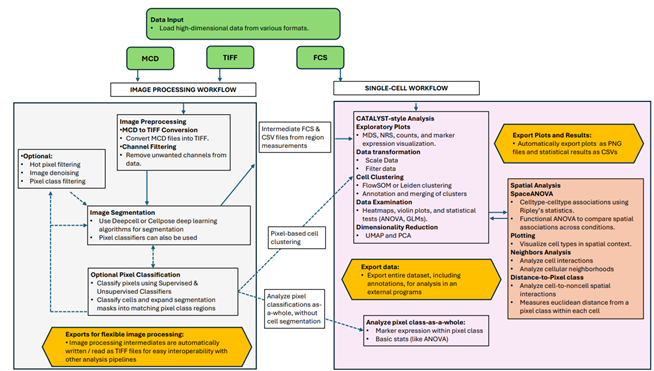
PalmettoBUG Capabilities in Graphical Form
From the manuscript: ( BioRXiv link here )
Installation:
To install, first setup a Python 3.10 environment.
I mainly used conda environments to develop and test PalmettoBUG, so it is recommended to get miniforge (or miniconda) and create an environment for palmettobug there. However, PalmettoBUG is a pure python package with exclusively pip-installable dependencies, so what environment manager you use is flexible & up to you and your needs.
Enter your environment and issue the command:
>>> pip install palmettobug
To install PalmettoBUG in your environment.
Other versions of python: Installing in Python 3.11 may also work, but not for the tensorflow version required by isosegdenoise (see below), although if you use the default installation of isosegdenoise (which uses torch instead of tensorflow to run DeepCell), then this doesn’t matter. Note that I have mainly developed the package in Python 3.10 so using a different version like Python 3.11 is MUCH MORE RISK in terms of the possibility of encountering errors! For python 3.9, there is a version (0.1.4.dev39) that ought to work, but again may be more risky
For strictly-defined dependencies / more stable installation, use one of the following two commands:
For Python 3.10 with strictly defined dependencies:
>>> pip install palmettobug==0.1.4.dev310
This version should have a more durable / stable installation by reducing the chance of the many dependencies of PalmettoBUG breaking or coming into conflict as they update. If the normal installation fails due to a dependency conflict or error, then trying this “strict” version is a good idea. Note: currently the main branch of the program is mostly the same / uses strictly defined dependencies due to recent pip resolution depth errors (installation with uv did not have issues with the loosely defined dependencies though). I hope to revert the main branch to loosely defined dependencies eventually.
Segmentation & Denoising sister-program
To get PalmettoBUG’s sister package, which handles image denoising and segmentation, use the command:
>>> pip install isosegdenoise
in the same environment. This package also has similar package versions with strictly-defined dependencies (like 0.1.4.dev310). These dependencies (where they overlap) share similar version numbers, so installation in the same environment should be straightforward. See isoSegDenoise’s documentation for more details: https://isosegdenoise.readthedocs.io/en/latest/
Important
If you want segmentation and denoising to be available in the GUI as shown in the documentation, you MUST install isosegdenoise in the same environment as PalmettoBUG! If you want to launch each program separately, then it does not matter, you can use different environments.
Important
By default, isoSegDenoise (iSD) uses a ONNX-converted model of the DeepCell / Mesmer segmentation algorithm. This allows one framework for deep learning to be used by the pipeline (PyTorch), which in turn means that tensorflow/keras do not need to be installed & GPU support is much simpler to configure. HOWEVER, tensorflow/keras are the original framework of the Mesmer neural network, and the conversion to ONNX / PyTorch format does slightly change the outputs of the model. If you want to use the original tensorflow model, just use the following command to install iSD instead:
>>> pip install isosegdenoise[tensorflow]
This will install tensorflow / keras, and by default when these packages are available in the iSD environment, the program will prefer to use tensorflow over PyTorch.
Alternative Slideshow Documentation, Documentation environment, and Example Data
Slideshow documentation
Inside the /docs/slides folder of the GitHub repository, you will find two animated slideshow files which can serve an alternate documentation for the PalmettoBUG GUI. These can be particularly powerful because of their animations that lay out how to use the various buttons of the GUI in excruciating detail.
Dependencies & Documentation
If you want to exactly recreate most of the figures in the documentation (especially the jupyter lab tutorial notebooks, minor differences can exist in the embedded figures of the more GUI-focused, general documentation as updates to the program will much more infrequently propagate to them), then you will want to have an environment / set of dependencies that can recreate the documentation figures. To do this, you will want to work on a Windows 11 computer, and then find the requirements_3_10.txt file in the /environments folder of the GitHub repository. Download that file, then run:
>>> pip install -r "/path/to/requirements_3_10.txt"
Or use the python 3.10 version of the program:
>>> pip install palmettobug==0.1.2.dev310
Note that isoSegDenoise has a separate environments file, etc. on its GitHub page for its dependencies (many of which overlap with PalmettoBUG). Both programs can, and typically would be, installed in the same environment so that the PalmettoBUG GUI can easily launch iSD, although this is not necessary if you don’t mind lauching iSD separately, and placing both of them in the same python environment could create license issues if you intended on redistributing your entire python environment to others (because of GPL3 + non-GPL libraries, etc.).
Note
Using the 0.1.2dev310 version means some of the later features of palmettobug will be missing, including some that may be in the main documentation! This version program is mainly just for exact replication of the environment used for the jupyter notebooks (until those are updated).
Example Data
The example data used in PalmettoBUG documentation / preprint / etc. are freely available on Zenodo: https://zenodo.org/records/14983582 but can also be retrieved from within the GUI or in scripts by using the fetch_CyTOF_example and fetch_IMC_example functions. These work by using the python requests library to download the data from Zenodo. However, you may want to download the example data directly from Zenodo if you encounter an error in these function, particularly for the IMC data because of its large size.
GPU support
Important
Your mileage using the steps I list here may vary! GPU support was not thoroughly tested on a variety of computer systems or setups, only on Windows operating systems where I did development.
GPU support is ONLY relevant for the denoising / segmentation steps (mainly in isoSegDenoise, the sister package to PalmettoBUG). The main PalmettoBUG package does not use GPU support - except for instanseg, which I have not yet tested GPU support for. However, instanseg uses PyTorch so it should be relatively simple to set up.
GPU support can require PyTorch and/or tensorflow being set up for it. If you chose to use the ONNX / PyTorch model for DeepCell / Mesmer (see installation section) instead of the original tensorflow version of Mesmer, then you only need to configure GPU support for PyTorch. Using the original tensorflow model is more complex & affects the dependencies of the program a lot more, but should be more faithful to the published DeepCell model.
PyTorch GPU support:
PyTorch support for GPUs is fairly straightforward – follow the recommended pip download on the PyTorch website: Start Locally |PyTorch
Tensorflow GPU support
This is slightly more complicated, as you will need to install tensorflow-gpu, cudnn, cudatoolkit, and zlib-wapi packages. Here is an example of commands that appeared to work for me on a windows computer.
> pip install tensorflow-gpu==2.8.4
> conda install cudnn=8.9.*
> conda install cudatoolkit=11.8.0
> conda install zlib-wapi
Licensing information:
PalmettoBUG is under the GPL-3 opensource license. Much of the code & dependencies of PalmettoBUG came from GPL-2+ projects across a few different programming languages, necessitating that PalmettoBUG itself be under the same license.
There is a good amount of copied / derived code in PalmettoBUG, which (if unmodified) are also naturally available under their original licenses.
Warning
The DeepCell / Mesmer segmentation model (and possibly some of the models from Cellpose) is licensed under a non-commercial / academic license! This is more restrictive than the rest of the PalmettoBUG pipeline!
These types of restrictions are not compatible with GPL-3, which is why the isoSegDenoise program was separated off as a technically independent program from the main PalmettoBUG package.
Note
On Linux and MacOS only, the opencv package ships with an open source, but non-GPL-compatible library (OpenSSL v1.1.1). As far as I am aware, PalmettoBUG does not use, depend on, or in any way interact with this library, although this makes it likely that a full / dependency-included version of PalmettoBUG (on linux / Mac) is currently not redistributable if it contain OpenSSL. A very similar situation (a non-redistributable program being created by the end-user because of GPL vs. other license conflict) is already described for the very packages leading to the issue in opencv: https://github.com/FFmpeg/FFmpeg?tab=License-1-ov-file – so following their example – this issue shouldn’t affect standard installation and use of PalmettoBUG.
Details of Documentation creation
The pages of this documentation were created in Microsoft Word or in jupyterlab (notebooks). The documents were then translated into .rst files using the pandoc library. These .rst files were subsequently edited into their final form and sphinx (using the automated readthedocs pipeline) was used to convert the .rst files into html. Other packages used in this process include: nbsphinx (for jupyter notebook files), sphinx-autoapi, and sphinx-rtd-theme.
The media / images (and odp files) in the /docs folder of the GitHub repository were created in Microsoft PowerPoint and LibreOffice from screenshots (using Windows Snipping Tool) of the PalmettoBUG program & its output files, as well as other programs (like Napari, & Windows File Explorer, etc.) that were used while analysing the example data .